$50 one-time purchase

Local Screen Recorder with AI Transcription

Record screen, system audio, and microphone on Mac. AI transcription runs locally. No bots, no cloud uploads, no subscriptions.

REC

Video coming soon

No signup required. No bot joins your call. Just hit record.

By the Numbers

Specifications.

02-04

Transcription Speed

60-minute recording / M1-M3 Macs

$50

One-Time Purchase

No subscriptions • No recurring fees

00:00

Setup Time

No accounts • No configuration

Features

visibility_off

No Meeting Bots

Records locally without joining meeting as participant. No visible bot in call.

computer

Local Processing

All recording and transcription happens on Mac. No cloud uploads, no accounts, no data sharing.

payments

$50 One-Time

$50 one-time purchase. No subscriptions, no monthly fees.

How to Use

1

Choose What to Record

Select full screen or individual window. Choose audio sources: system audio, microphone, or both.
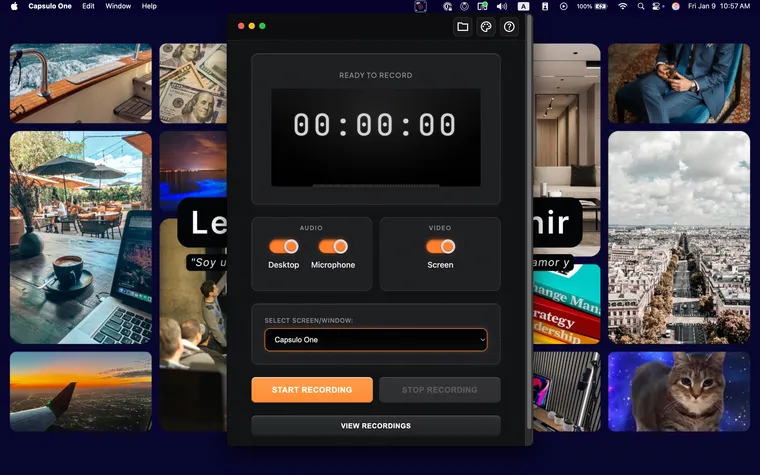
Screen selection UI
2

Hit Record

Captures screen, system audio, and microphone simultaneously. Audio meters show input levels.
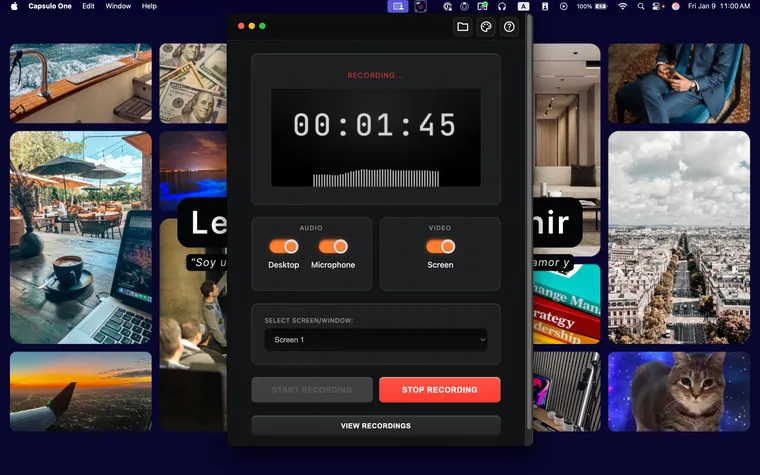
Recording in progress
3

Stop and Save

AI transcription processes in real-time. Stop recording and save. View recording with synchronized transcript.
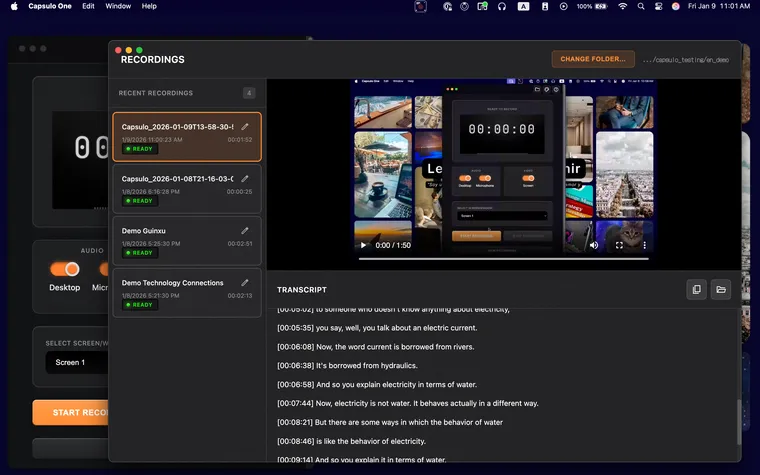
Transcript viewer

Recording Responsibly

Capsulo One records locally without adding bots to calls. You must still comply with recording consent laws in your jurisdiction.

Recording laws vary:

  • check_circle 38 US states: One-party consent (you can record if you're part of the conversation)
  • gavel 12 US states require all parties to consent: CA, CT, FL, IL, MD, MA, MI, MT, NV, NH, PA, WA
  • public International: Laws vary by country (GDPR in EU, different rules in UK, Canada, Australia, etc.)

Best practice:

Inform participants when recording, even where not legally required. Capsulo One is designed for personal documentation with consent, not secret recording.

Capabilities

transcribe

Local AI Transcription

Speech-to-text runs on Mac. No internet, API keys, or usage limits.

mic

System Audio Capture

Records desktop audio and microphone. No virtual cables or third-party drivers.

memory

Apple Silicon Optimized

60-minute recording transcribes in 2-4 minutes on M1/M2/M3.

play_circle

Built-In Viewer

Watch recordings with synchronized transcript. Search, copy, export text.

shield

No Telemetry

No analytics, no cloud sync, no data collection. App cannot send data externally.

laptop_mac

macOS Native

Built for Mac. Includes workarounds for macOS 15 Sequoia audio bugs.

Interface Themes

Four visual themes inspired by recording hardware. Same functionality, different aesthetic.

00:00

Default

Grayscale with orange and red accents

00:00

VCR

1980s home video • Amber LED

00:00

Walkman

Sony portable • Metallic chrome

00:00

Terminal

Command-line • Green phosphor

Same functionality • Different aesthetic

Comparison

Feature Capsulo One Loom tl;dv Fireflies OBS
Visible bot joins call Never N/A Always Always N/A
Data stored locally
AI transcription ✓ (local) ✓ (cloud) ✓ (cloud) ✓ (cloud)
Pricing $50 once $12.50/mo $18/mo $10/mo Free
System audio capture N/A N/A Complex setup
Account required
Internet required

Use Cases

phone

Client Calls

Record client meetings for personal notes. No visible bot in call. Recordings stay local.

school

Tutorial Creation

Create screencasts with automatic transcripts. Export text for documentation.

groups

Team Meetings

Document stand-ups and async updates. Share recordings directly without cloud storage.

Download Capsulo One

$50 one-time purchase. Offline AI transcription. Local processing.